2.2.3. 
DICOM is a standard for the exchange of medical images and related information between different modalities and systems. Proper use of pipe can greatly simplify the DICOM data related processing implementation, improve accessibility for data navigation, then accelerate obtaining content to be investigated in subsequent studies.
2.2.3.1. Regroup DICOM dataset
Regrouping a DICOM dataset is a crucial step in processing medical images. It involves rearranging the DICOM files into a more organized and manageable format. This process ensures that the images can be easily accessed and analyzed by medical professionals.
More specifically, this operation must indispensably identify the DICOM files typically stored in a specific folder or directory, based on relevant criteria such as some attributes (e.g. patient ID, study date) in file headers, to ensure that the images are grouped together in a meaningful way.
2.2.3.1.1. Unrolling and reading attributes
DICOM header is of a hierarchical structure that organizes attributes of DICOM object. Expanding its structure can visualize the keywords for these attributes. Examples can refer the snippet in Code 3.155. Multi layered attribute is flatten via list in our design. For instance, if the value of ReferencedFractionGroupNumber in Code 3.155 is desired, we can read that by:
v = dcm_attr_loader(data=file, attr_path=['ReferencedRTPlanSequence', 'ReferencedFractionGroupSequence',
                                          'ReferencedFractionGroupNumber'])
# or alternatively:
v = dcm_attr_loader(data=plan_seq, attr_path=['ReferencedFractionGroupSequence', 'ReferencedFractionGroupNumber'])
2.2.3.1.2. Create file relation map
It gives solution to that by generating a cache for file relation map, instead of directly operating on original data (e.g. transferring or copy into new space) that results in heavy read-write load.
from info.me import io, Unit, unarchive
from info.med import rebuild as dcm
import os

p = Unit(mappings=[io.search_from_root, dcm.dcm_regroup])
p = p.shadow(search_condition=lambda x: x[-3:] == 'dcm', regroup_reference=['0010|0010'])
m = p(data='path/to/dicom/folder') if not os.path.exists('./_regroup_refs.pyp') else unarchive(data='_regroups_refs')

for patient_id, path_of_files in m['regroup_result'].items():
    ...
The processing frame in Code 2.19 shows if there is no file relation cache exists inplace, using the pipeline to generate it, otherwise load that cache where patient-wise data processing could be started.
2.2.3.2. Construct DICOM images
Reading DICOM images is a time-consuming and labor-intensive task that commonly requires processing multiple files at once. This typically involves reading the DICOM files from the file system, decoding the DICOM metadata, and extracting the pixel data for further computation.
Assume to process a folder of DICOM dataset: each patient has his or her sub-folder as second-level directory, within which there are two sets of medical images for CT and MR scans respectively. Combine the operations of file search and folder relocating (see demonstration), its implementation can be fulfilled as:
from info.me import io, Unit
from info.med import rebuild as dcm

for f in io.leaf_folders(data='path/to/root/folder'):
    dcm_slices = [_ for _ in io.search_from_root(data=f, search_condition=lambda x: x[-3:] == 'dcm')]
    for img in dcm.dcm_constructor(data=dcm_slices):
        print('-'*80, f"Patient ID: {img.metas.get('0010|0010')}", f"Image modality: {img.metas.get('0008|0060')}",
              f"Image shape: {img.rcs_array.shape}", f"Image spacing: {img.rcs_spacing}", sep='\n')
        ...
The ellipsis denotes real execution in this code block. Considering there might be varying research purposes from the identical dataset, thus it will make convenience to wrap Code 2.20 into an generator function:
def gen(root='path/to/root/folder'):
    for f in io.leaf_folders(data=root):
        dcm_slices = [_ for _ in io.search_from_root(data=f, search_condition=lambda x: x[-3:] == 'dcm')]
        for img in dcm.dcm_constructor(data=dcm_slices):
            yield img

for img in gen():
    ...  # do something on img for purpose 1

for img in gen():
    ...  # then do something on img for purpose 2
Additionally, if DICOM files are not axial slice images exclusively (e.g. struct, dose file are also included), the reconstructed object can even link to these extra files to acquire corresponding advanced functions. In that case however, a single variable to accept set of DICOM files is not enough. Function to distinguish whether the file is of image or not, is also required. For example, in following demonstrations, it can be seen the reconstructed image self can directly map ROI name into array, and into DVH result for different studies, after linking to struct and dose files respectively.
2.2.3.3. Comprehensive applications
To illustrate its flexibility of operations on DICOM files, let’s consider two distinct studies as examples.
2.2.3.3.1. Imaging feature extraction
Consider the DICOM dataset with case folders as sub directories, within which there
are one set of CT scan, and the corresponding structure DICOM file where ROI stored. As shown in
Code 2.22, each search step can ensure the last case must be struct file, hence
two variables slices and struct are declared, to accept these two different types of DICOM file(s).
With linking the constructed image into the struct file via link_struct, the method roi_name_map will
be activated in _gen_for_feature.
After wrapping with lambda calculus frame, the loader can be treated as the
connector, integrating from file system to the feature extraction.
from info.me import io, F, Unit
from info.med import radiomics_features
from info.med import rebuild as dcm

def _gen(root):
    for f in io.leaf_folders(data=root):
        *slices, struct = [_ for _ in io.search_from_root(data=f, search_condition=lambda x: x[-3:] == 'dcm')]
        img = dcm.dcm_constructor(data=slices)[0]  # one set only
        img.link_struct(data=struct)
        yield img

def _gen_for_feature(root, roi_names):
    for img in _gen(root):
        patient_name = img.metas.get('0010|0010')
        roi_arrays = [_ for _ in img.roi_name_map(data=roi_names)]
        for roi_name, roi_array in zip(roi_names, roi_arrays):
            yield patient_name + ' | ' + roi_name, img.rcs_array, roi_array, img.rcs_spacing

loader = F(lambda **kw: _gen_for_feature(kw.get('data'), kw.get('roi_names', [])))
p = Unit(mappings=[loader, radiomics_features])
Return value from the above pipeline is a data frame object with patient name coupled with ROI name as its indexing, while imaging features as its columns. The Figure 2.12 shows a glance of the feature collection, obtained using lesion, invasion1 and invasion2 in ROI name list.
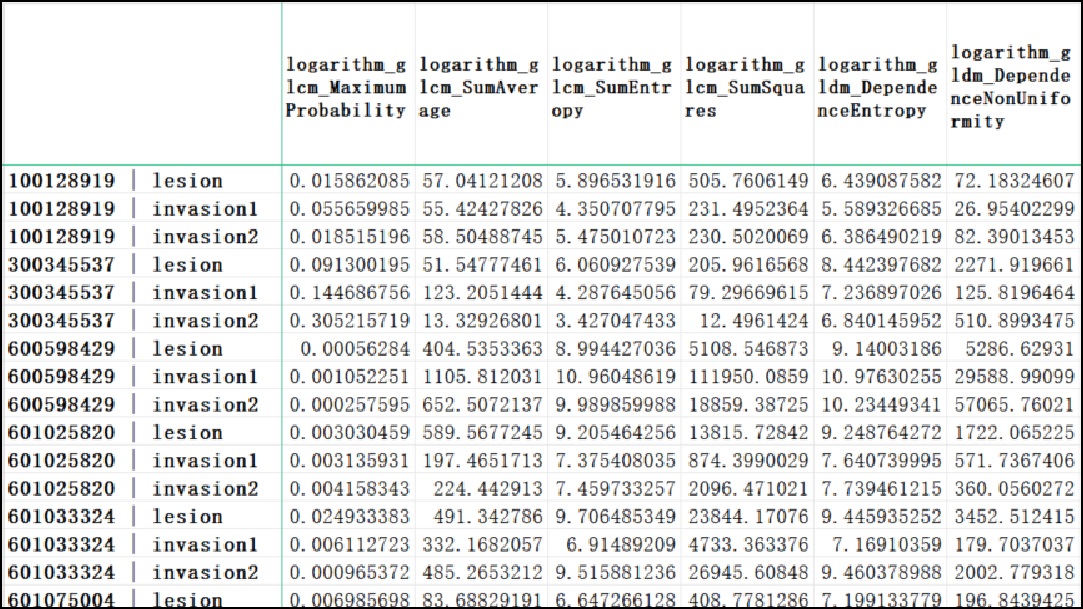
Figure 2.12 image feature collection
2.2.3.3.2. Evaluation for radiotherapy schedule
An evaluation for radiotherapy schedule is crucial for ensuring effective treatment and minimizing side effects. Conducting a thorough evaluation can help healthcare professionals ensure that the chosen radiotherapy schedule provides the acceptable outcomes for the patient.
Except for struct DICOM, in radiotherapy schedule task there must be a dose file. Make sure the DICOM files have
been properly subdivided into set for image, dose, and struct file individually (as shown in
Code 2.23), the linkage from constructed image, to dose and struct file will
activate methods of roi_name_map and dvh_name_map respectively, after which calculation directly
from list of ROI names to be investigated is available.
from info.me import io
from info.med import rebuild as dcm
from info.vis import visualization as vis
from info.vis import ImageViewer
from info.basic.functions import dvh_res_to_vis

*m, dose, struct = [_ for _ in io.search_from_root(data='case/folder', search_condition=lambda x: x[-3:] == 'dcm')]
img = dcm.dcm_constructor(data=m)[0]
img.link_struct(data=struct)
img.link_dose(data=dose)

study_roi = ['CTV', 'PCTV', 'Rectum']
study_arrays = img.roi_name_map(data=study_roi)
dvh = img.dvh_name_map(data=study_roi)

ImageViewer.play(data=img.rcs_array, spacing=img.rcs_spacing, origin=img.rcs_origin, mask=study_arrays)
vis.Canvas.save(data=dvh_res_to_vis(dvh), save_as='DVH1.png',
                fig_configs=vis.FigConfigs.Line.update(name=study_roi, pen=[_ for _ in 'rgb'],
                                                       symbol=None),
                cvs_legend=True, cvs_left_label='Volume (%)', cvs_bottom_label='Dose (Gy)',
                cvs_title='Dose Volume Histogram (DVH)')
Last two lines in Code 2.23 visualize the image as DVH figure. The 3D image and the selected ROIs will be like Figure 2.13:
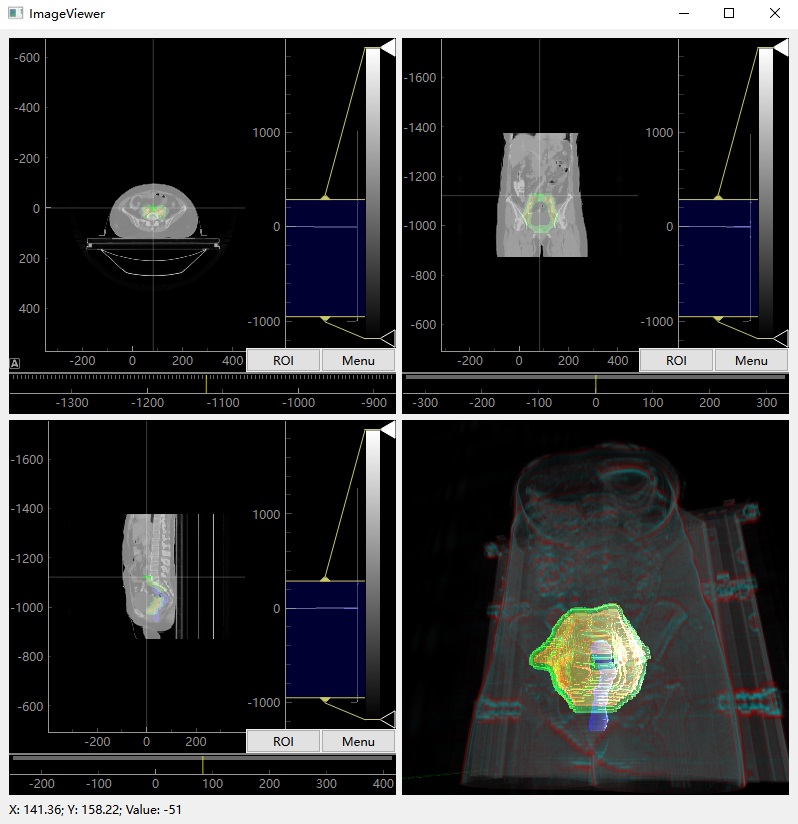
Figure 2.13 visualization for cervical cancer case with ROIs
The computed DVH result is shown as Figure 2.14 and will be export as DVH1.png inplace.
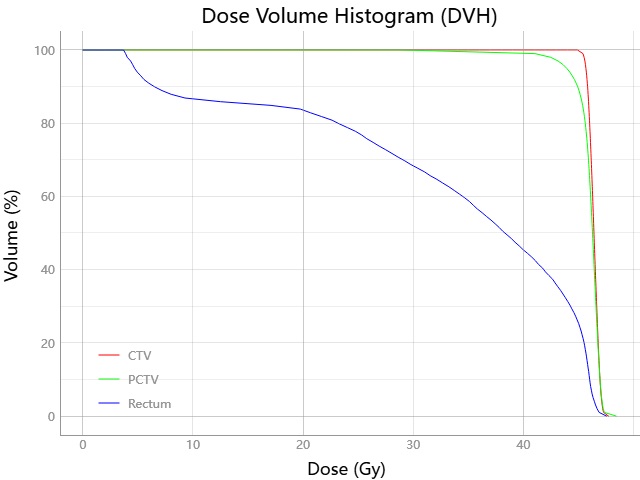
Figure 2.14 dose volume histogram for ROIs
Include the main body of Code 2.23 within a callable unit make its logic available anywhere. If batch processing is necessary, it can automatically generate DVH figures, maybe useful for downstream analysis.
- Authors:
Chen Zhang
- Version:
0.0.5
- Created on:
Feb 19, 2024